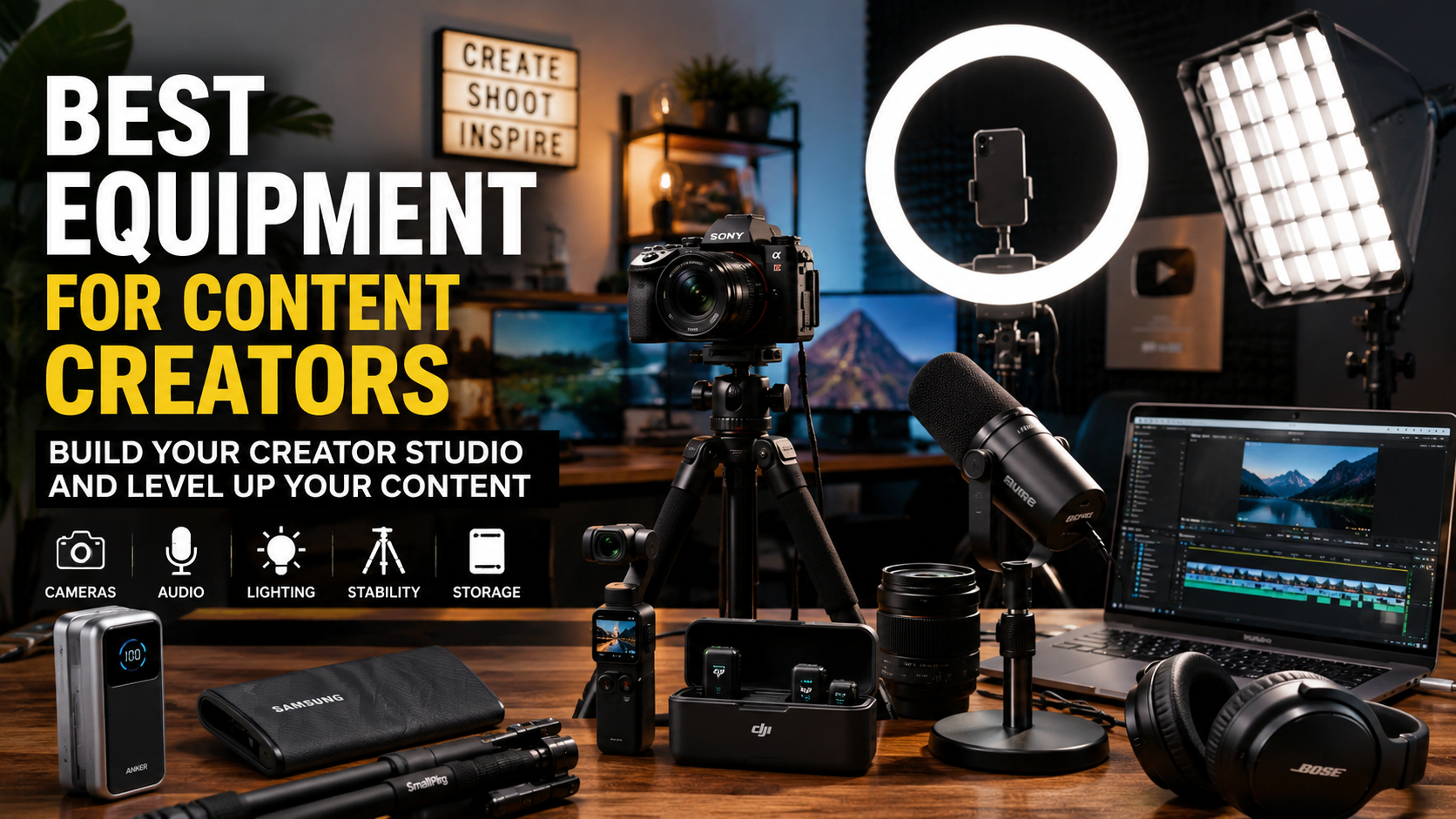
If you want to become a serious content creator, filmmaker, YouTuber, TikTok creator, podcaster, streamer, or online educator, here is the truth: your phone alone can get you started, but the right equipment can make your content look and sound completely different.
And no, you do not need to buy every expensive thing on the internet. The smartest way to build your first creator studio is to choose equipment that actually improves your workflow: better sound, better light, stable video, enough storage, reliable power, and simple tools that help you create faster.
That is why I created this list of the best equipment for content creators right now. These are practical tools for creators who want better quality without making their setup too complicated.
You can see the full creator equipment list here:
Best Equipment for Content Creators
Why Content Creators Need Better Equipment
A lot of people think content creation is only about ideas. And yes, ideas matter. But if your video is shaky, your sound is unclear, your face is badly lit, or your files are all over the place, people may leave before they even understand how good your idea is.
Good equipment helps you look more prepared, more professional, and more trustworthy.
It does not mean you are trying to look fake. It means you are respecting your audience’s time.
When someone clicks your video, they want to hear you clearly. They want to see your face. They want the video to feel easy to watch. They want the experience to feel clean. This is why investing in the right equipment can make a huge difference.
If you are building your first creator studio,
start here
Start With Power and Storage
Before talking about cameras, lights, and microphones, let’s talk about something many creators forget: power and storage.
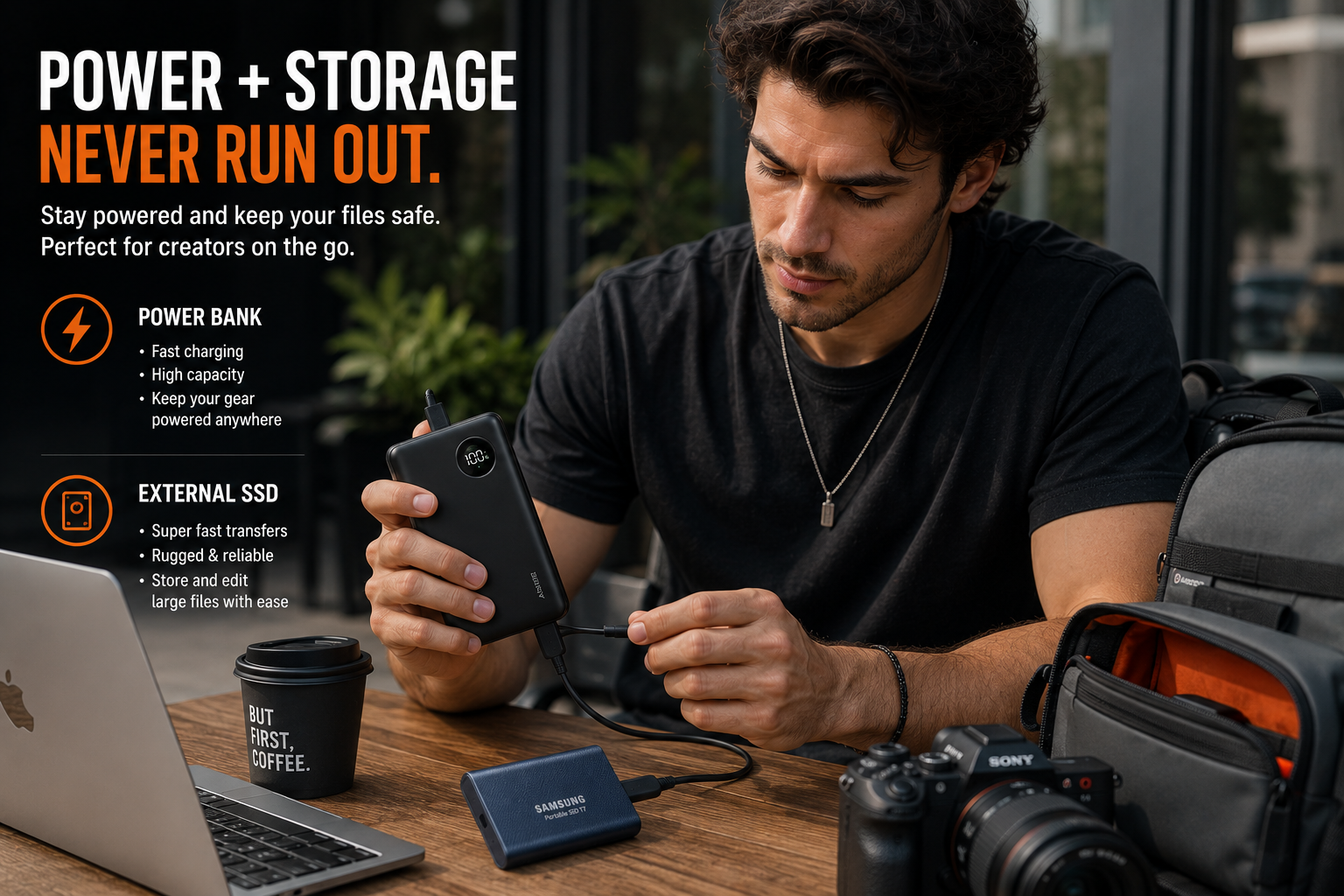
If you create content seriously, your phone, camera, laptop, lights, and microphones will always need power. Running out of battery during filming is one of the most annoying things ever. That is why a strong power bank is a must-have.
The Anker 737 Power Bank is a great pick for creators because it gives you portable charging power for phones, laptops, and other devices. If you film outside, travel, shoot behind-the-scenes content, or work long hours away from your desk, this kind of power bank can save your day.
Storage is just as important. Video files are heavy. 4K footage, camera files, podcast recordings, and edited projects can fill up your computer fast. The Samsung T9 Portable SSD 2TB gives creators fast external storage, which is important when you are editing videos, backing up files, or moving projects between devices.
A creator who does not organize files properly will eventually lose time, energy, and maybe even important footage. So before buying fancy gear, make sure your power and storage are ready.
See the full power and storage picks here
Get Stable Shots With Tripods and Gimbals
One of the fastest ways to make your video look more professional is simple: stop making it shaky.
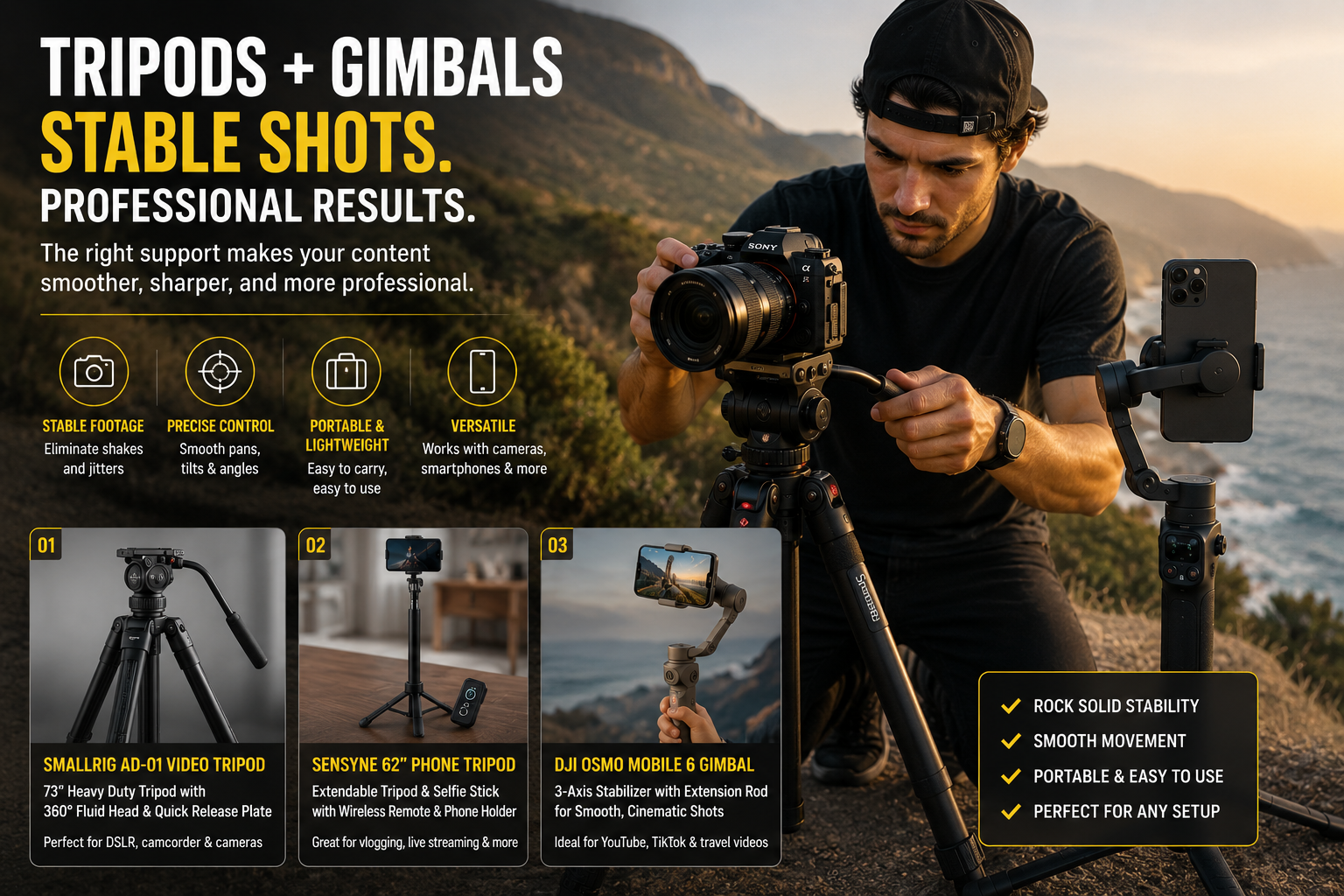
A tripod is not boring. A tripod is one of the most important tools for creators. If you film talking-head videos, product reviews, tutorials, interviews, livestreams, or online courses, you need something stable.
The SmallRig AD-01 Video Tripod is a strong option for DSLR cameras, camcorders, and bigger filming setups. It gives you a more serious video production feel, especially if you want smooth movement and stable framing.
For phone creators, the SENSYNE 62” Phone Tripod & Selfie Stick is a budget-friendly option. It is simple, useful, and easy to set up. If you are creating TikToks, Reels, Shorts, or casual talking videos, this is the kind of tool that makes filming much easier.
If you film walking shots, travel content, product shots, or lifestyle videos, the DJI Osmo Mobile 6 Smartphone Gimbal Stabilizer can help make your phone footage smoother. A gimbal is especially helpful when you want movement without that messy handheld shake.
Stable video makes your content easier to watch. And when your content is easier to watch, people stay longer.
Check the full tripod and gimbal list here
Lighting Can Change Everything
Bad lighting can make even a good camera look cheap.
Good lighting can make even a simple phone video look much better.
That is why lighting is one of the smartest upgrades for content creators. If you film indoors, make videos at night, record tutorials, livestream, take product photos, shoot beauty content, or create talking videos, lighting matters.
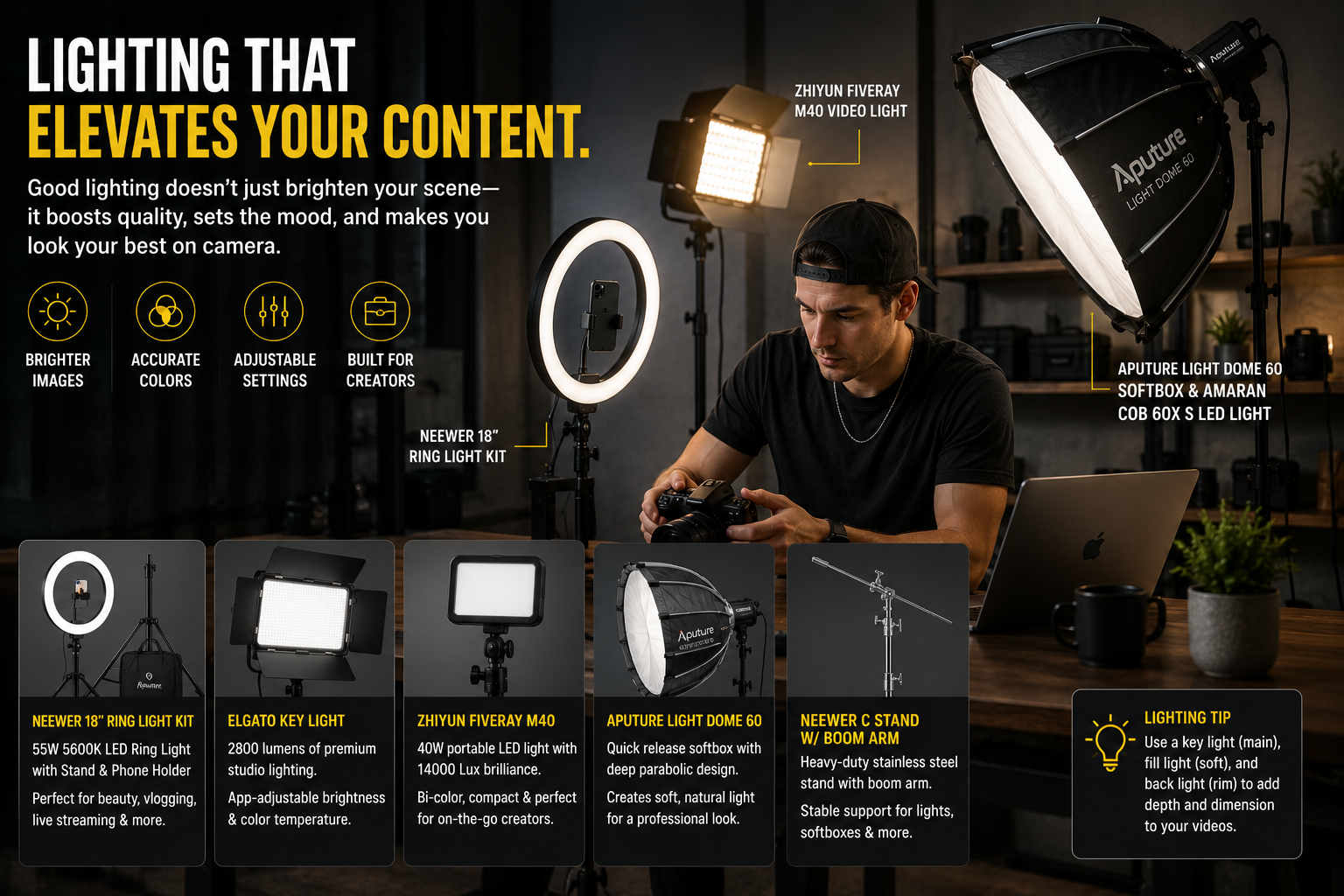
The NEEWER Ring Light 18-inch Kit is useful for creators who need simple front lighting. It works well for beauty videos, talking-head content, livestreams, tutorials, and social media videos.
The Elgato Key Light is a stronger studio-style option for streaming, recording, and video calls. It is especially helpful if you want adjustable brightness and temperature from your desk setup.
The ZHIYUN FIVERAY M40 Video Light is portable and powerful, which makes it useful for creators who need flexible lighting in different locations. Portable lights are great because you can move them around quickly without rebuilding your whole setup.
For a more cinematic look, the Aputure Light Dome Quick Dome 60 Softbox and Aputure Amaran COB 60X S LED Video Light are strong choices. This kind of setup is useful if you want softer, more professional lighting for interviews, film-style videos, product content, or studio shoots.
The NEEWER C Stand with Boom Arm is also important if you want to place lights safely and creatively. A good stand helps you control your lighting instead of just putting lights wherever they fit.
Lighting is not just about brightness. It is about mood, shape, focus, and making people look good on camera.
See my recommended lighting setup here
Audio Is More Important Than People Think
People may forgive a video that is not visually perfect. But if the audio is painful to listen to, they will leave.
That is why microphones are one of the best investments for any content creator.
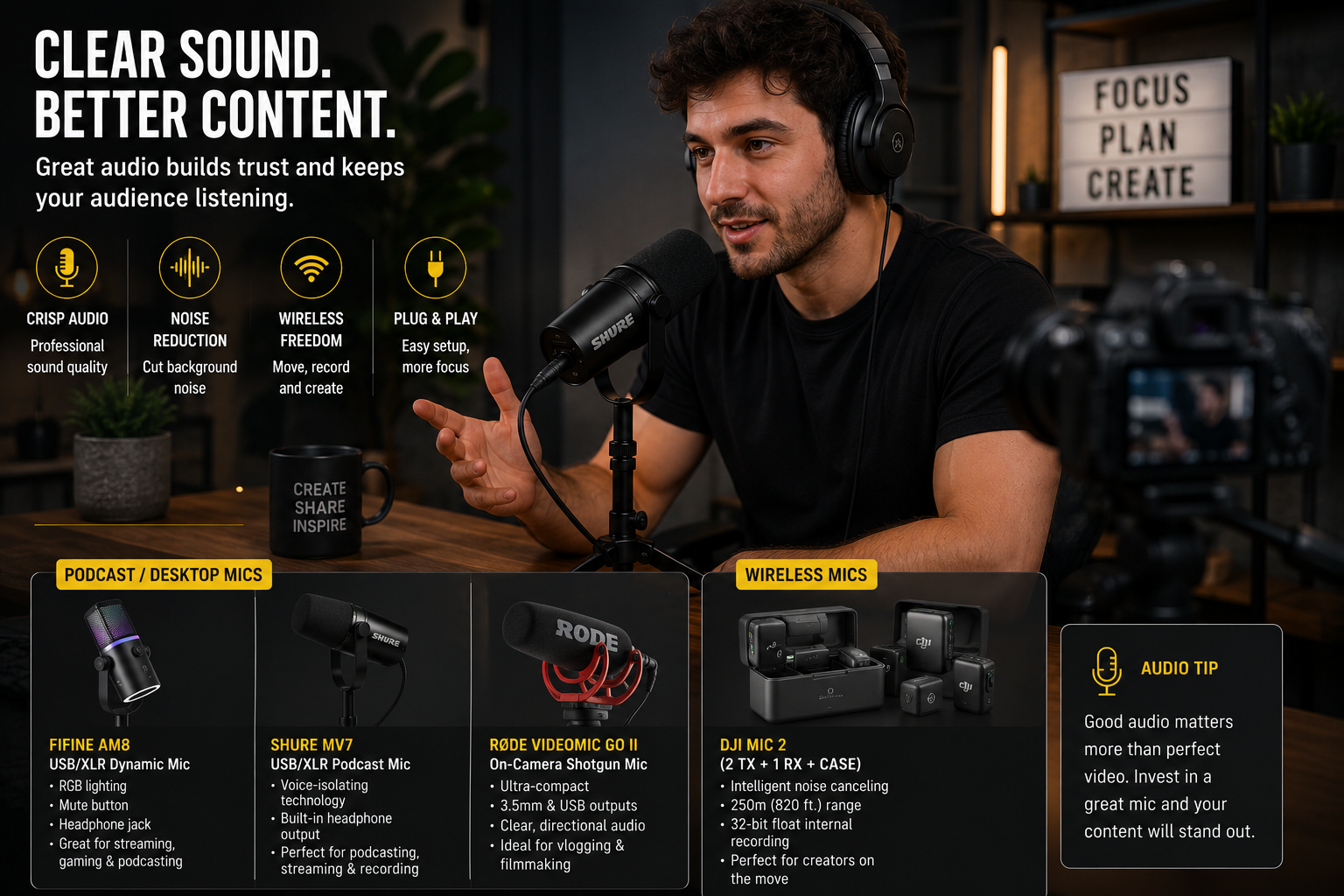
The RØDE VideoMic GO II is a great on-camera shotgun microphone for filmmakers, vloggers, podcasters, and content creators who want better sound without a huge setup. It is compact, practical, and useful for camera-based videos.
The FIFINE USB/XLR Dynamic Microphone is a strong budget-friendly option for podcasting, gaming, livestreaming, YouTube, and voice recording. It is especially useful if you want a desk microphone that can grow with your setup.
The Shure MV7 USB Podcast Microphone is a more premium choice for podcasting, recording, livestreaming, and voice-heavy content. If your content depends on talking, commentary, education, or storytelling, better voice quality can make your brand feel more professional.
For creators who film interviews, travel content, behind-the-scenes videos, or social media content, the DJI Mic 2 is very useful. Wireless microphones give you freedom to move while keeping your voice clear. The charging case, noise cancelling, internal recording, and long range make it a strong option for serious creators.
Better audio makes people trust you more. It makes your content feel cleaner, more direct, and more watchable.
Explore the microphones I recommend here
Cameras and Video Tools for Better Content
You can start with a phone. But when you are ready to upgrade, the right camera can help your content look more cinematic and professional.
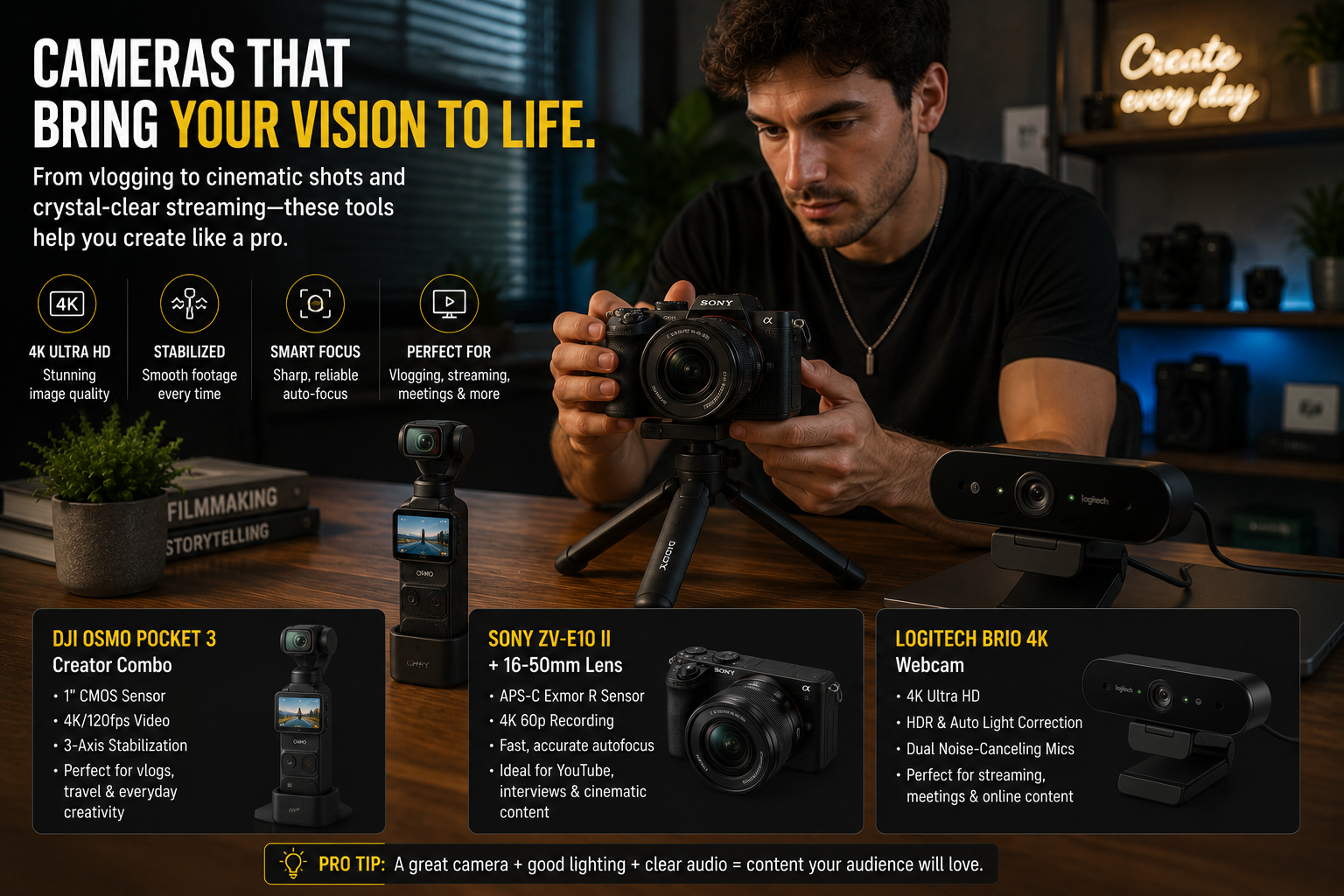
The DJI Osmo Pocket 3 Creator Combo is one of the most exciting tools for creators because it is small, stabilized, and designed for vlogging and social video. It is especially useful for YouTubers, travel creators, lifestyle creators, and anyone who wants high-quality video without carrying a huge camera setup.
The Sony ZV-E10 II Pro Video Bundle is a stronger camera setup for creators who want a more professional look. It is useful for YouTube videos, interviews, cinematic content, product videos, and serious creator work. A camera bundle also helps beginners because it includes several accessories you may need to start filming.
The Insta360 X5 Essentials Bundle is great for action, travel, creative shots, and 360° content. If you want to create more dynamic videos or capture unique angles, a 360 camera can help your content stand out.
The Logitech Brio 4K Webcam is useful if you create livestreams, online courses, video calls, webinars, remote interviews, or desk-based content. A better webcam instantly improves how you appear in online meetings and live content.
The Freewell M2 Magnetic Filter Kit is also useful for creators who want better control over light and reflections. ND filters and CPL filters help video creators shoot outdoors and keep footage looking cleaner.
Better camera tools do not automatically make better content, but they give you more creative control.
Headphones Matter for Editing
If you edit video, music, voiceover, podcasts, or livestream audio, good headphones matter.
The Bose QuietComfort Ultra Bluetooth Headphones are useful for creators who need noise cancelling, comfortable listening, and strong audio monitoring. When you edit, you need to hear details clearly. Background noise can make it harder to focus, especially if you work from home, travel, or edit in busy environments.
Good headphones help you notice mistakes before your audience does.
What Should Beginners Buy First?
If you are just starting, do not buy everything at once. Start with the tools that fix your biggest problem.
If your video looks dark, buy lighting first.
If your audio sounds bad, buy a microphone first.
If your video is shaky, buy a tripod or gimbal first.
If your phone or laptop keeps dying, buy a power bank first.
If your files are messy or your storage is full, buy an external SSD first.
If you want better image quality, then consider upgrading your camera.
A smart creator setup does not have to be expensive from day one. It has to be useful.
Start with one upgrade. Use it. Make more content. Then upgrade again when you know what you actually need.
Your Creator Studio
Does Not Need to Be Perfect
You do not need a perfect studio to start creating. You do not need the most expensive camera. You do not need a giant production team. But you do need tools that make your work easier, cleaner, and more professional.
The best creator equipment is the equipment that helps you create consistently.
A better microphone can make your voice clearer. A good light can make your face look better. A tripod can make your video stable. A power bank can save your shoot. An SSD can protect your files. A better camera can help your work look more serious.
If you are building your first creator studio or upgrading your current setup, I created this Amazon list to make it easier for you to choose practical tools without wasting time searching everywhere.
Check out the full list here:
Affiliate Disclosure: Some links in this article may be affiliate links. This means I may earn a small commission if you click and make a purchase, at no extra cost to you. This helps support my work and allows me to keep sharing useful resources for creators.