CapCut AI vs InVideo AI: Which AI Video Tool Should Creators Use?
If you create videos for YouTube, TikTok, Instagram Reels, Facebook, online courses, affiliate marketing, or client work, you already know the truth: video creation can eat your whole day. Filming is one thing. Editing, captions, resizing, voiceover, hooks, music, and exporting for every platform? That is where creators start losing hours.
That is why the comparison of CapCut AI vs InVideo AI matters in 2026. Both tools can help creators make videos faster, but they are not built for exactly the same purpose. CapCut AI is better for editing and polishing content you already filmed, while InVideo AI is better for turning ideas, prompts, or scripts into videos faster. If you are building your creator setup from zero, you can also check my recommended creator gear here: Best Equipment for Content Creators.
Affiliate disclosure: Some links in this article are affiliate links, which means I may earn a commission if you sign up or buy through my links, at no extra cost to you.
That is the first thing creators should understand: AI tools are powerful, but they work best when your setup also supports you. A decent microphone, light, tripod, camera, or storage device can make your content look and sound much more professional. So before you ask, “Which AI video tool is better?” the real question is: what kind of videos are you trying to make?
What Is CapCut AI?
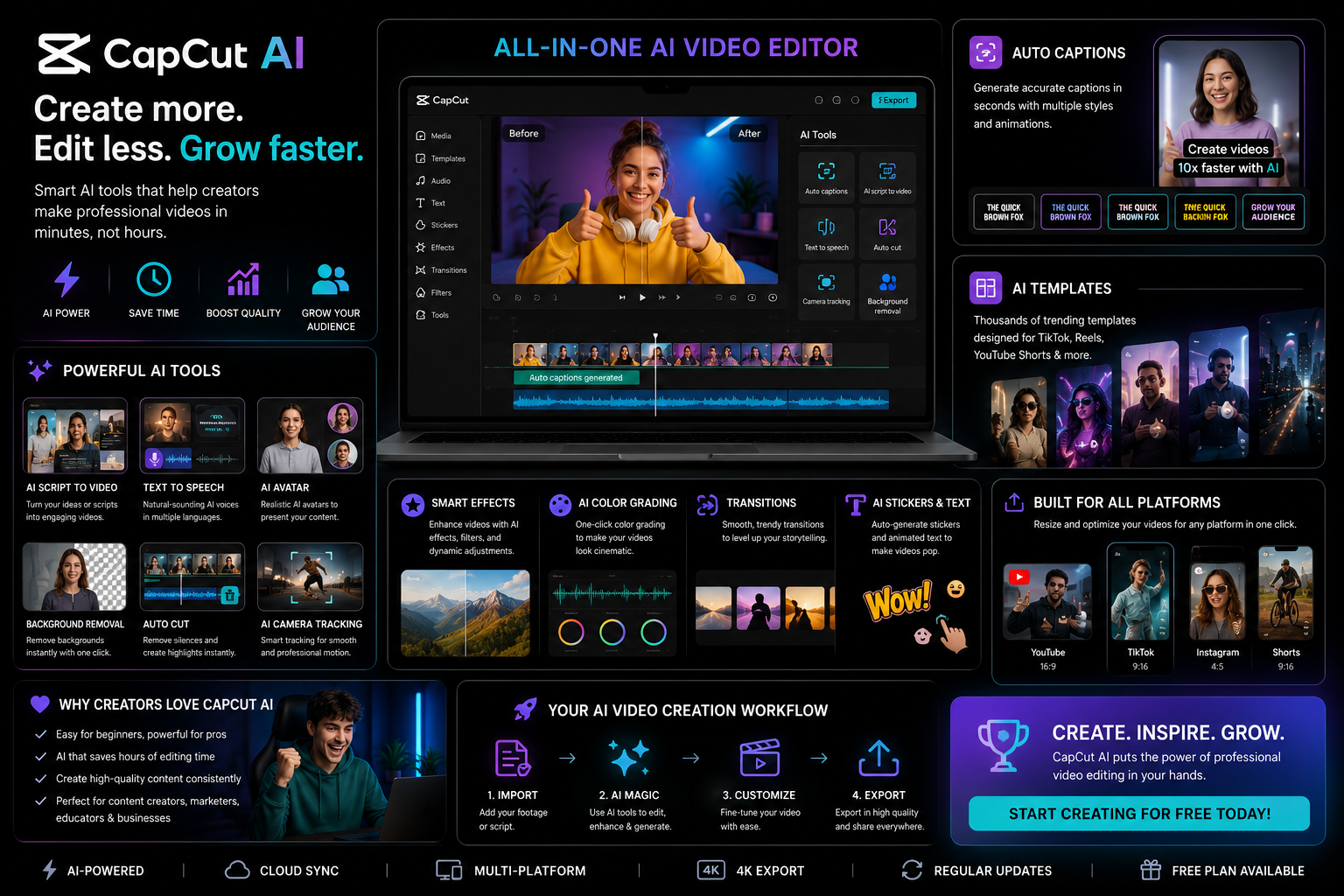
CapCut AI is an AI-powered video editing tool made for creators who want to edit faster, especially for short-form content. If you create TikTok videos, Instagram Reels, YouTube Shorts, Facebook videos, podcast clips, product videos, or talking-head content, CapCut AI is one of the easiest tools to understand.
Its biggest strength is speed. You can use it to edit clips, add captions, resize videos, use templates, remove backgrounds, clean up content, and make your videos look more ready for social media. For creators who film themselves or already have footage, CapCut AI can save a lot of time.
CapCut AI is especially useful for creators who need to post often. If your content strategy depends on daily or weekly short-form videos, editing speed matters. You cannot spend five hours editing every single clip. At some point, you need a tool that helps you move faster without making your videos look lazy.
What Is InVideo AI?
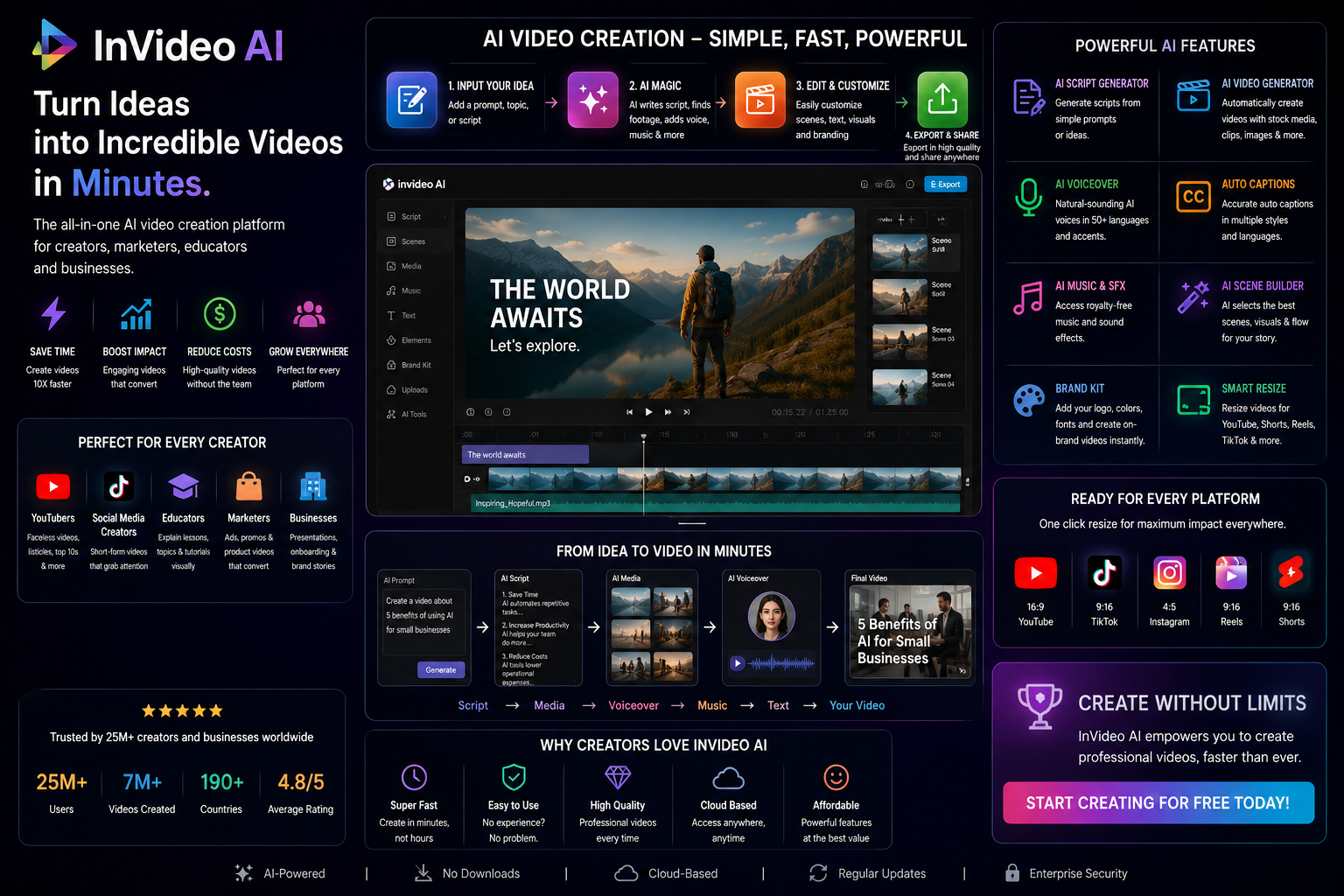
InVideo AI is different. Instead of focusing mainly on editing footage you already have, InVideo AI is more useful when you want to create a video from an idea, prompt, or script. It can help generate video drafts, marketing videos, explainer videos, faceless YouTube videos, product promos, and educational content.
This makes InVideo AI helpful for creators who do not always want to film themselves. For example, if you are a blogger, affiliate marketer, course creator, small business owner, or YouTuber making list-style content, InVideo AI can help you turn text into video much faster.
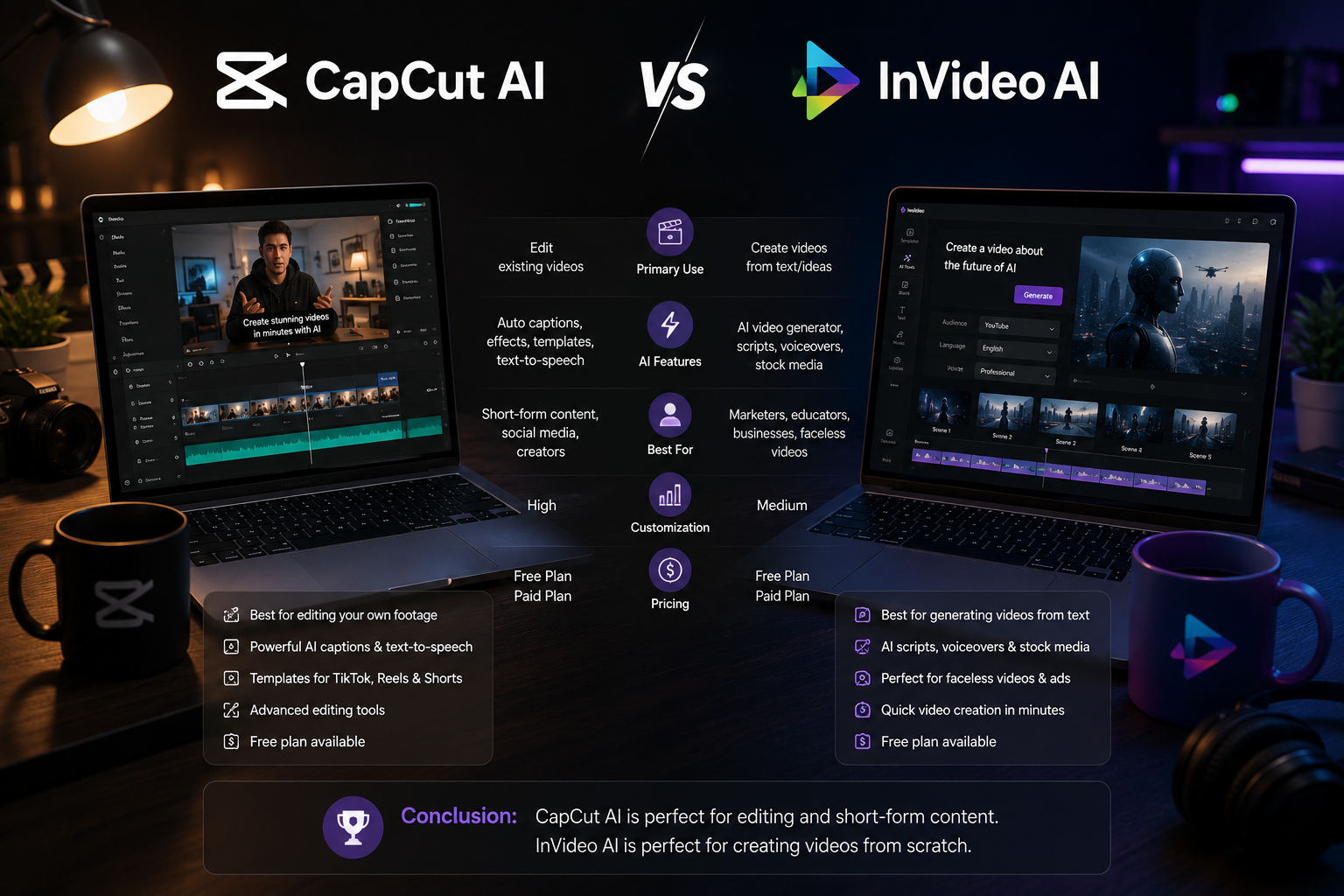
The best way to understand it is simple: CapCut AI helps you edit faster. InVideo AI helps you create faster from scratch.
CapCut AI vs InVideo AI: The Main Difference
The biggest difference between CapCut AI vs InVideo AI is the starting point.
CapCut AI works best when you already have footage.
InVideo AI works best when you have an idea or script and need help turning it into a video.
If you record videos on your phone and want to add captions, cut mistakes, resize the video, and make it social-ready, CapCut AI is probably the better choice. If you have a blog post, product idea, YouTube concept, or educational script and want AI to help create the video structure, InVideo AI may be better.
This is why I don’t think creators should see them as direct enemies. They can actually work together. You can use InVideo AI to generate a first version of a video, then use CapCut AI to polish, caption, resize, and make shorter social clips.
Best Option for Short-Form Creators
If you mainly create TikTok videos, Instagram Reels, YouTube Shorts, Facebook Reels, or podcast clips, CapCut AI is the better first choice.
Short-form content depends on speed, pacing, captions, hooks, and visual rhythm. CapCut AI is designed for that kind of workflow. It is easy to use, beginner-friendly, and very practical for creators who need to publish consistently.
Best for:
- TikTok creators
- Instagram creators
- YouTubers making Shorts
- Podcasters creating clips
- Social media managers
- Product reviewers
- Affiliate marketers making short videos
If you want to edit short-form videos faster and make your content look more polished, CapCut AI is the tool I would recommend first for creators who already record their own footage.
Try CapCut AIBest Option for AI Video Creation
If you want to create videos from scripts, prompts, articles, or ideas, InVideo AI is the better choice.
This is especially useful if you do not want to appear on camera all the time. Not every creator wants to film their face daily, and not every business has enough footage ready. InVideo AI can help you create explainer videos, promotional videos, educational videos, faceless YouTube content, and social media ads faster.
Best for:
- Faceless YouTube channels
- Online educators
- Affiliate bloggers
- Small business owners
- Course creators
- Product promo videos
- Explainer videos
- List-style content
If you want to turn ideas, scripts, or articles into videos faster, InVideo AI is the tool I would recommend for creators who want AI to help build the video, not just edit it.
Try InVideo AICapCut AI Pros and Cons
Pros
- Great for short-form videos
- Easy for beginners
- Strong for captions and social clips
- Useful for TikTok, Reels, and Shorts
- Good for creators who already film their own content
- Helps speed up repetitive editing tasks
- Works well for personal, social, and creator-style videos
Cons
- Not always ideal for long, complex videos
- Some templates can look overused
- Still needs human creativity and editing taste
- Professional editors may want more advanced control for larger projects
CapCut AI is best when you want speed and simplicity. It is not about replacing creativity. It is about removing the boring parts of editing so you can publish more.
InVideo AI Pros and Cons
Pros
- Great for turning prompts into videos
- Useful for people who do not have footage
- Good for explainer videos and marketing content
- Helpful for faceless YouTube videos
- Can support script-based video creation
- Good for businesses and educators
- Saves time when starting from a blank page
Cons
- AI-generated videos can feel generic if you do not customize them
- May need editing before publishing
- Less personal if you rely only on stock-style visuals
- Prompts may need testing to get the best result
InVideo AI is best when you want a video draft quickly. But you still need to guide the tool. AI can help, but it should not replace your taste, message, and personality.
Which Tool Is Better for YouTube?
For YouTube Shorts, CapCut AI is usually better because short-form video needs fast editing, captions, pacing, and hooks.
For faceless YouTube videos, explainer videos, educational content, or product videos, InVideo AI may be better because it helps turn scripts and ideas into structured videos.
For serious YouTube creators, the best workflow may be both: use InVideo AI for video drafts or concepts, then use CapCut AI for shorter clips, captions, and repurposing.
Which Tool Is Better for TikTok and Instagram?
For TikTok and Instagram Reels, CapCut AI wins for most creators. These platforms reward fast, direct, caption-heavy, mobile-friendly content. CapCut AI fits that workflow better.
InVideo AI can still be helpful for educational Reels, product promos, or faceless videos, but if your content is personality-driven, CapCut AI feels more natural.
Which Tool Is Better for Businesses?
For businesses, the answer depends on what kind of content they already have.
If a business already films product demos, founder videos, customer testimonials, behind-the-scenes clips, or event content, CapCut AI is useful for editing and repurposing.
If a business needs explainer videos, promo videos, ads, or video content from written ideas, InVideo AI is useful because it helps generate video drafts quickly.
Small businesses can use both: InVideo AI for structured marketing videos and CapCut AI for short social clips.
Quick Comparison: CapCut AI vs InVideo AI
Choose CapCut AI if you want to:
- Edit existing footage
- Add captions quickly
- Make TikToks, Reels, and Shorts
- Repurpose long videos into clips
- Create social media content faster
- Keep your own face, voice, and personality in the content
Choose InVideo AI if you want to:
- Create videos from scripts
- Make faceless videos
- Turn blog posts into videos
- Create explainer content
- Make marketing videos
- Start video creation without filming everything yourself
Use both if you want to:
- Create more videos in less time
- Build a full AI video workflow
- Turn ideas into drafts
- Edit and polish content faster
- Repurpose content across multiple platforms
Which AI Video Tool Should Creators Use in 2026?
So, which tool wins: CapCut AI or InVideo AI?
For most social media creators, CapCut AI is the better first choice. It is fast, simple, and built for everyday content creation. If you are making TikToks, Reels, Shorts, podcast clips, or social videos, CapCut AI will probably fit your workflow immediately.
For creators who want AI to help generate videos from ideas, scripts, or blog posts, InVideo AI is the better first choice. It is useful for faceless content, explainer videos, marketing videos, and educational content.
But the smartest answer is this: use the tool that matches your workflow.
If you film first, use CapCut AI.
If you write first, use InVideo AI.
If you want to move faster in 2026, use both.
And remember, tools are only part of the system. Your video quality also depends on sound, lighting, camera setup, and consistency. If you are ready to take content creation seriously, do not wait until everything is perfect. Start with the right tools, build your setup, and publish more consistently.
Start building your creator setup before your next video, then choose the AI video tool that fits your workflow.
Creator Equipment List Try CapCut AI Try InVideo AIThe creators who win in 2026 are not always the ones with the fanciest gear or biggest team. They are the ones who create, publish, learn, and keep going.
FAQ: CapCut AI vs InVideo AI
Is CapCut AI better than InVideo AI?
CapCut AI is better for editing existing footage, short-form videos, captions, and social media clips. InVideo AI is better for creating videos from prompts, scripts, or ideas.
Is InVideo AI good for beginners?
Yes. InVideo AI is beginner-friendly because it helps users turn ideas or scripts into videos faster, especially for faceless videos, explainer videos, and marketing content.
Can I use CapCut AI for YouTube?
Yes. CapCut AI is useful for YouTube Shorts, video captions, social clips, and repurposing longer videos into shorter content.
Which AI video tool is best for TikTok?
CapCut AI is usually better for TikTok because it is built for short-form editing, captions, templates, and fast social media video creation.
Should creators use both CapCut AI and InVideo AI?
Yes. Creators can use InVideo AI to create video drafts from ideas and CapCut AI to edit, caption, polish, and format videos for social platforms.